
From Phone to Dashboard Screen: Smart Car Connectivity in Everyday Driving
Morning commutes now begin long before the engine starts, as drivers tap screens and flick settings from the sofa or office desk. Routes, music and climate are ready on arrival, while the display behind the wheel quietly coordinates data, comfort and control throughout each journey.
This story is part of Esgamesol's practical reading library across everyday topics.
From Pocket Screen to Car Screen
How phones link up
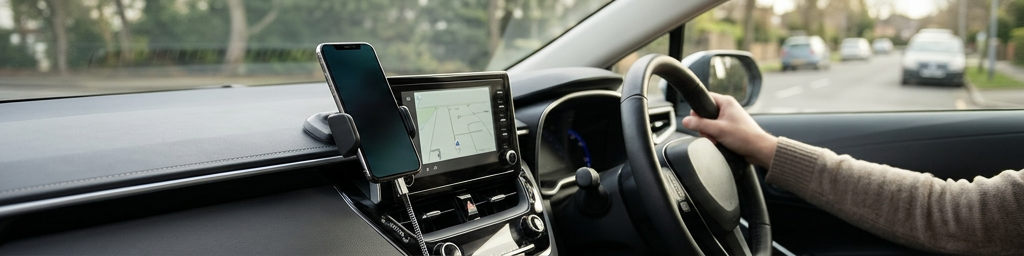
Modern cabin displays act like a larger, safer window into what lives on a pocket device. The handheld provides apps, data, contacts, playlists, and messages, while the vehicle contributes a bigger display, speakers, microphones, and wheel‑mounted buttons. Connection usually happens either through a cable or a wireless pairing. A wired link keeps things steady and charges the device; a wireless link feels more relaxed, letting the phone stay in a bag or pocket. Once paired, the car requests a trimmed‑down version of selected apps, hiding anything that demands too much attention, and highlighting navigation, audio, calls, and simple planning tools.
What runs on the phone, what runs in the car
Even though the dashboard appears to be doing everything, the phone still carries a lot of the workload. It pulls map tiles, handles music streams, manages contacts, and keeps track of conversations. The car focuses on clear visuals and simple controls. If the data signal drops, downloaded playlists or offline maps can usually keep going. A major benefit is consistency: drivers can switch vehicles and still see the same familiar layouts, as long as the onboard system supports the right standard, because updates arrive through the mobile device rather than waiting for new in‑car software.
Everyday Routines Made Easier
Getting around with smarter guidance
Digital guidance has become the backbone of many daily trips. Instead of typing addresses on a tiny screen, drivers glance at a larger map close to their line of sight. Saved places such as home, workplace, schools, or regular stores appear with a tap or short phrase. Live traffic, lane hints, and re‑routing suggestions adapt in the background, so detours for congestion or roadworks become simpler decisions. Some systems even consider fuel or battery range when planning longer drives, suggesting suitable stops on the way and adjusting arrival estimates when conditions change.
Music, podcasts, and peace of mind
Audio controls feel more natural when bundled on a single, simplified surface. Streaming platforms, internet radio, and audiobooks appear as big tiles with large play, pause, and skip buttons. Wheel‑mounted controls let drivers nudge volume or move tracks without lifting a hand far from the rim. Passengers can help manage the queue from the central screen, avoiding the awkward handoff of a phone. Because the layout is straightforward and predictable, it becomes easier to keep attention on mirrors and traffic rather than flipping between separate apps.
Handling calls and messages safely
Connectivity also reshapes how people stay in touch on the move. Incoming calls surface on the central panel, with clear options to answer or decline using buttons on the wheel. Texts and chat messages can be read aloud, then answered using voice dictation or short preset replies. This does not remove distraction completely, but it cuts down on the urge to glance at a tiny handheld screen. For many drivers, a small set of ready‑made replies, such as “driving, will call later,” strikes a balance between staying responsive and staying focused.
Sharing cars without losing the “personal” feel
In households, carpools, or shared fleets, different people often use the same vehicle. Once a device has been paired, the system usually remembers that identity. On the next trip, it can restore favorite audio apps, recent routes, and language or theme choices. Some models support separate profiles, so seating, mirrors, and climate preferences can line up with the account that just connected. The result is a shared vehicle that still feels tailored to whoever is driving at the moment.
Inside the Interactive Cabin
Touch, buttons, and wheel controls
Despite the large touch panel, physical controls still matter. Most layouts mix a central screen with knobs, rocker switches, and wheel‑mounted buttons. The main screen shows large tiles for navigation, audio, communication, and a few extras, often with a small row of shortcuts for home, back, and recently used tools. Wheel buttons handle common moves: changing volume, skipping a track, picking up a call, or waking a voice assistant. Over time, drivers develop muscle memory, learning to perform these actions by feel while keeping eyes on the road ahead.
Voice assistance as a driving shortcut
Pressing a single button to speak a command can replace several screen taps. Modern assistants recognize phrases like “take me to the nearest fuel stop,” “play my driving playlist,” or “send a message to my partner.” When recognition works smoothly, drivers can adjust plans mid‑journey without diving into menus. Voice tools are especially helpful in heavy traffic or on unfamiliar roads, where hands and eyes are already busy. For shy speakers or noisy cabins, the system still offers touch controls as backup, so nobody is forced into a single interaction style.
Personal layouts and profiles
Customisation helps align the cabin with real habits instead of a generic design. Many systems let users pin favorite apps, rearrange tiles, or pick which widgets appear first. One driver might choose a large map with small audio controls; another might highlight playlists, with navigation tucked into a side strip. Separate profiles mean each regular driver can keep their own arrangement. That stability matters: when icons stay in familiar spots, it becomes easier to act quickly without wondering where everything went after an update.
Balancing comfort and focus
More digital options can also mean more chances for distraction. Thoughtful use of presets and shortcuts keeps that risk in check. Planning a route and lining up a playlist before moving reduces the need for mid‑journey tinkering. Some systems block complex actions while in motion, such as typing long searches or setting up new accounts, nudging drivers to finish setup while parked. The goal is not to remove choice, but to steer attention gently back toward the road whenever possible.
Apps, Maps, and Remote Links Working Together
How different tools cooperate
The most useful connected experiences arise when separate tools cooperate quietly. A calendar entry with an address can feed straight into navigation. A parking app can pop up options near the destination just as the journey ends. An audio app can fade volume slightly when guidance speaks, then restore it automatically. The driver only sees a smooth flow: one screen, one wheel, one voice channel, even though multiple services are talking to one another in the background.
| Scenario type | Helpful integrations across tools | Typical driver benefit |
|---|---|---|
| Regular commute | Calendar events linking to navigation and audio resuming automatically | Faster morning setup, less fiddling with screens |
| Family trips | Shared playlists, location search, and hands‑free group messaging | Easier coordination and fewer arguments over devices |
| Urban errand runs | Live parking suggestions and quick searches for shops along the route | Less time circling blocks or switching between applications |
| Long highway journeys | Planned fuel or charging stops and estimated arrival updates to contacts | Reduced planning stress and clearer expectations for others |
These combinations do not need to be elaborate. A handful of well‑chosen links between guidance, communications, and entertainment can cover most daily needs without cluttering the interface.
Remote control from outside the vehicle
The connection does not stop at the doors. Companion apps on a handheld device let owners check whether doors are locked, view remaining range, or locate the car on a map. Climate functions can often be started remotely, cooling or warming the cabin before anyone steps inside. In large car parks, a simple map marker or light flash can save a long search. While these actions are not used constantly, they create a sense that the vehicle is part of a wider digital routine, not an isolated machine.
Vehicle status and gentle guidance
The digital cluster and central screen also present the car’s own voice. Simple icons warn about low fuel or battery, open doors, or low tyre pressure, and can link to brief, plain‑language explanations. Some systems suggest nearby service centres or remind drivers of upcoming maintenance windows. In electric or plug‑in models, range estimates and energy use views help people understand how climate settings, speed, and cargo affect distance. Over time, this feedback encourages smoother driving habits without lecturing.
Q&A
-
How does Mobile App Vehicle Access improve everyday digital driving beyond simple keyless entry?
It enables remote locking, climate pre-conditioning, location sharing, and service alerts, turning the phone into a control hub that streamlines daily routines like school runs, commuting, and shared‑car access. -
What are the practical benefits of Navigation System Integration with a connected dashboard?
Deep integration lets routes sync from phone to dashboard, adapt to live traffic, show lane guidance, and coordinate with EV range, parking availability, and calendar events for smoother, safer trips. -
Which Driver Convenience Technologies have the biggest impact on reducing stress in city driving?
Features like real-time parking guidance, congestion-aware rerouting, hands-free calling, and app-based fuel or charging payment cut decision fatigue and distractions, making dense urban driving more manageable. -
In what ways do Connected Dashboard Tools enhance a Modern Auto Interface for multi-device users?
They unify music, calls, messages, maps, and vehicle data into one customizable screen, syncing profiles across drivers and devices so the car feels familiar whether you use iOS, Android, or built-in apps. -
How can drivers make Everyday Digital Driving safer when relying heavily on modern auto interfaces?
By prioritizing voice controls, simplified display layouts, and do-not-disturb modes, and configuring key functions before moving, drivers can enjoy connectivity benefits while minimizing distraction risk.