
From Manuals to Mixed Reality: Augmented Training That Lives on the Workspace
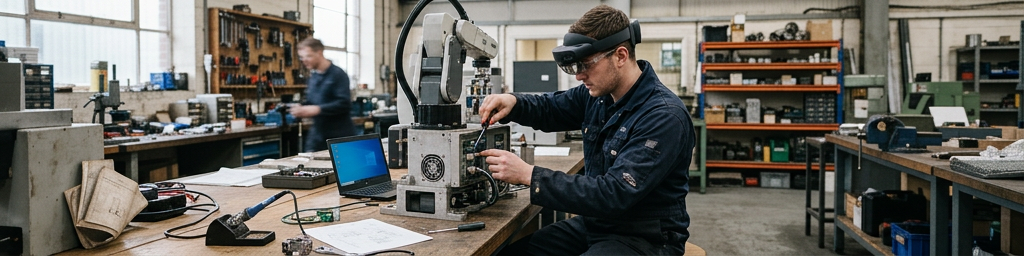
A maintenance technician looks at a machine and sees step‑by‑step prompts floating beside real components, while a new hire practices complex assembly on a digital twin before touching actual equipment. Across factories, hospitals, and classrooms, this blend of physical spaces and virtual cues is reshaping how people learn.
This story is part of Esgamesol's practical reading library across everyday topics.
From static instructions to guidance that lives on the task
Why separating learning from doing causes trouble
In many workplaces, training still happens far away from the real task: a slide deck in a meeting room, a long video on a laptop, or a thick binder on a desk. People are expected to absorb the theory, then walk onto a shop floor, into a lab, or onto a job site and remember every detail. That jump from “knowing” to “doing” is where confidence drops, errors appear, and experts get pulled away to answer the same questions again and again. The mental effort of translating diagrams into three‑dimensional action is especially heavy for complex, high‑pressure work. When every lever looks similar and every connector has a near‑twin, even motivated learners can feel lost or intimidated, slowing down both learning and operations.
Bringing help directly onto tools, parts, and spaces
Layered digital guidance closes that gap by sitting right on top of the real task. Instead of constantly glancing back and forth between a screen and a crowded machine, learners see arrows, outlines, and short prompts aligned with the exact part they should touch. A hidden valve can glow, a specific connector can be outlined, and a panel can show only the current step beside the component itself. This style of support works especially well for people who learn by doing: their eyes, hands, and body are all engaged with the real environment while the digital layer quietly nudges them along. Over multiple repetitions, muscle memory builds faster, and the written procedure becomes a safety net rather than the main teaching tool.
What people actually see: layers of cues, steps, and feedback
From simple highlights to animated motion paths
The visual layer used in modern training systems is often more practical than flashy. Basic elements like arrows, circles, and glow effects pull attention to the right screw, handle, or test point. Labels can float beside components, finally answering the “what is this thing called?” question without hunting through part numbers. For more complex actions, ghosted 3D models or translucent animations can show how a part should slide, rotate, or lock into place. In a paint booth mock‑up, a faint motion path can indicate the ideal sweep of a spray gun; in a clinical practice room, a transparent organ model can reveal depth and angle during a simulated procedure. These visual hints turn hard‑to‑describe motions into something people can copy almost instantly.
Step‑by‑step panels that move with the learner
Instead of a long list of instructions on a wall chart, modern systems often present only one or two steps at a time, directly beside the relevant object. As soon as a step is detected as complete—because a sensor moved, a button was pressed, or a virtual confirmation was tapped—the next one appears. This pacing keeps attention anchored to the task and cuts down on skipped steps or backtracking. Panels can show tiny reference images, short warnings, or safety reminders at the moment they matter. For industrial assembly, that might mean an ordered tightening sequence; for a lab checklist, it could mean a reminder to record a reading before moving on. The instruction flow feels more like a coach talking than a manual lecturing.
Performance feedback that makes invisible details visible
A major strength of these visual systems is the way they reveal results that are normally hidden or delayed. During spray‑coating practice, surface coverage can appear as colored zones immediately after a pass, showing thin areas, heavy spots, or poor overlap without using real materials. In engine training, virtual gauges can respond instantly when a learner adjusts a setting incorrectly, making cause and effect obvious. In a simulated procedure, tissue models can change color if a tool is applied with too much pressure. Behind the scenes, analytics track timing, paths, and errors, but learners mostly see friendly signals: green when on track, amber when drifting, red when something needs attention. That fast feedback loop supports experimentation instead of punishing mistakes.
Practising risky and complex tasks without real‑world fallout
Turning real rooms into safe rehearsal spaces
One of the most powerful uses of workplace‑integrated training is the ability to practise difficult situations in a realistic setting without real‑world consequences. A powered‑down machine can behave as if it were live, with readings, alarms, and status messages appearing only in the learner’s view. Maintenance staff can rehearse shutdowns, startups, and fault responses in the actual aisles and around the actual cabinets they’ll use later. In clinical skills labs, learners can interact with mannequins or training tools while virtual patients and conditions are overlaid: vitals changing, symptoms evolving, or complications appearing. The room looks and feels familiar, yet everything risky is virtual, giving people the freedom to try, fail, and repeat without fear of harm or downtime.
Simulations that compress rare events into regular practice
Many critical skills hinge on scenarios that almost never happen—but must be handled perfectly when they do. Traditional training struggles with this, because organizations cannot easily stage real floods, equipment breakdowns, or emergency cases on demand. Layered digital scenarios fix that by summoning rare events as often as needed. Alarms can spread through a facility layout, virtual leaks can appear at specific joints, and status indicators can flash in patterns that signal unusual faults. Teams must navigate real corridors, coordinate in real noise, and use real radios or tools, while the system tracks their choices and timing. In this way, months or years of possible edge cases can be compressed into a few intense, memorable sessions.
Example decision guide for choosing practice modes
| Training mode focus | When it tends to work best | Typical learner experience |
|---|---|---|
| Classroom or video explanations | Introducing concepts and vocabulary before any hands‑on work | Listening, note‑taking, asking questions in groups |
| Screen‑based simulations | Practising logical choices or sequences without physical action | Clicking through branches, reviewing outcomes, repeating scenarios |
| On‑task visual overlays | Guiding real movements and procedures on actual tools and spaces | Looking, doing, adjusting, with prompts hovering in place |
| Full mixed‑reality scenarios | Rehearsing rare, risky, or multi‑step events in realistic settings | Moving through real rooms, reacting to virtual cues, debriefing after runs |
Blending these options keeps training flexible while ensuring that physically demanding or safety‑critical skills are grounded in realistic practice.
Where workplaces are already turning tools into teachers
Industrial and manufacturing environments
Production and maintenance teams often face equipment with many variants, dense layouts, and close safety margins. Overlay‑based guidance helps newcomers find the right panel, follow startup and shutdown sequences, and carry out changeovers without halting lines for days. In assembly areas, parts bins, fixtures, and fasteners can all carry visual hints about order, orientation, and checks. During inspections, workers can see which surfaces to examine and what acceptable conditions look like, anchored directly to the product. For experienced staff, the same systems act more like smart checklists and quick reminders when new product versions or updated procedures roll out, shortening the adjustment period and supporting consistent quality.
Technical education, trades, and apprenticeships
Hands‑on education programs increasingly combine real tools with digital cues. Automotive learners might work on physical components while virtual faults are injected into their view; instrument readings and symptoms change on demand. Electrical trainees can diagnose scripted issues on training boards, seeing overlays that suggest where to probe next once they’ve made an initial attempt. These approaches suit mixed‑ability groups: faster learners can dial back hints and push into more complex scenarios, while those who need repetition can keep detailed guidance visible. The result is a bridge between theory in a teaching space and responsibility out in the field, without requiring huge fleets of dedicated training rigs.
Healthcare, logistics, and service roles
In healthcare skills training, layered views can show internal anatomy aligned with practice tools, allowing learners to understand depth, angle, and relative position more intuitively. Emergency scenarios can overlay vital signs, environmental hazards, or triage priorities on simulated patients in real rooms. In warehousing and logistics, workers can follow highlighted pick routes, see shelf markers in their view, and receive live prompts to reduce mis‑picks or missed checks. Field service staff can stand in front of unfamiliar equipment while seeing each component labelled and each action confirmed, sometimes with a remote expert placing visual markers in their view. Across all these roles, the common theme is clear, on‑the‑spot support where time is tight and errors are costly.
Workspaces that double as ongoing learning environments
Layered digital guidance is pushing training out of isolated classrooms and into the spaces where work really happens. Instead of asking people to memorise complex procedures and then hope they recall them under pressure, organizations can offer clear, context‑aware prompts that appear exactly where hands and eyes already are. Simulations allow risky or rare events to be explored safely, while real tools and rooms keep practice grounded in everyday reality. When blended thoughtfully with mentoring, discussion, and traditional resources, this style of training turns factories, clinics, warehouses, and job sites into places where learning continues every day, not just during scheduled courses.
Q&A
-
How do immersive learning systems improve skills compared to traditional classroom training?
Immersive learning systems replicate real work contexts with high fidelity, enabling safe practice of complex tasks, immediate feedback, and higher knowledge retention through experiential learning and repeated, scenario-based exercises. -
What types of interactive skill development are best suited to industrial training simulations?
Procedural, safety-critical, and equipment-handling skills fit best, such as lockout/tagout, assembly and maintenance steps, emergency response, and quality inspection routines in manufacturing and logistics environments. -
How can digital instruction overlays be used on the factory floor without disrupting productivity?
They can run on AR glasses or tablets, triggering step-by-step visual cues only when needed, guiding workers during setup, changeovers, or troubleshooting while keeping hands free and minimizing workflow interruptions. -
What role do visual guidance platforms play in workplace technology education for new hires?
They act as on-demand digital mentors, walking new hires through tools, software, and machinery via contextual prompts, reducing onboarding time, dependence on senior staff, and errors during early learning phases. -
How should companies evaluate ROI when deploying industrial training simulations and visual guidance tools?
They should track metrics like error reduction, rework rates, training time, time-to-competency, safety incidents, and machine downtime, comparing pre- and post-deployment data to quantify performance and cost benefits.